Imputation Server Instruction
Before using this Imputation Server, you need to have a biosino account and login to the biosino. Please click here to register for your biosino account.
Submit your imputation tasks
Submit the imputation tasks at the homepage of this Imputation Server. Please read the instructions about input file requirements to ensure your data is in the correct format.
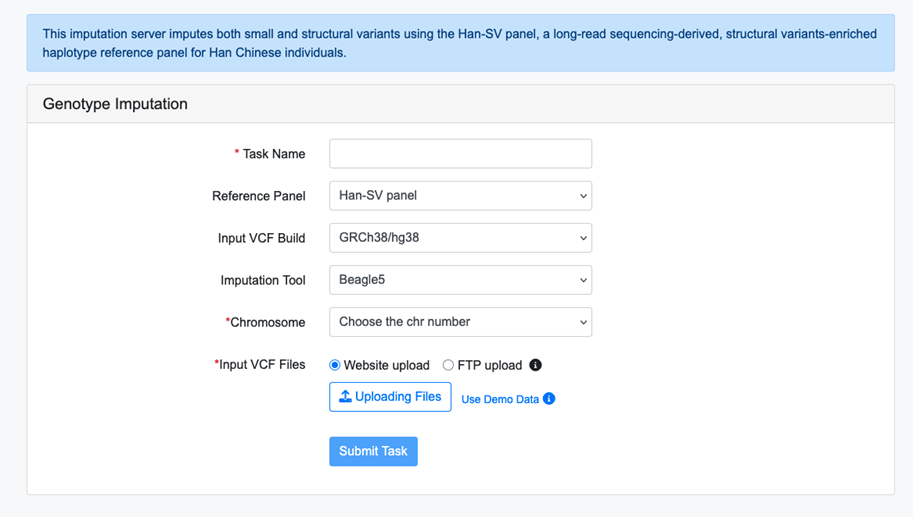
To submit an imputation task, the following information is required:
- Task Name: Please enter the unique task name for each of the imputation job. Only letter or number are allowed for task name. Space or special characters are not allowed.
- Reference Panel: We currently offer the imputation using the Han-SV panel.
- Input VCF Build: This imputation server supports both the GRCh38/hg38 and GRCh37/hg19 reference genome for data inputting. Please choose one based on the reference genome that you are using.
- Imputation Tool: We are using Beagle5 for imputation.
- Chromosome: Please select the chromosome for imputation, or select "all" if no specified chromosome for input.
- Input VCF File: Only one input file can be uploaded for each imputation task. Only letters or numbers are allowed for input file name. Space or special characters are not allowed.
Testing Data
The testing data is also provided for imputation by clicking on Use Demo Data.
File Upload Methods
To upload your file, there are two ways: "Website upload" or "FTP upload". We highly recommend uploading your input file using the FTP tool, if it exceeds 100 megabytes.
Please use your biosino username and password to login to sftp://fms.biosino.org:44404.
To upload files, you can use FTP Clients (such as FileZilla) or command line tools (such as lftp or sftp).
- When using FilleZilla, set the Host as
sftp://fms.biosino.organd Port as "44404". - When using command line tools, first run
lftp -u your_username,your_password sftp://fms.biosino.org:44404orsftp -P 44404 your_username@fms.biosino.organd enter your password, then runput your_input.vcf.gzto upload your file.
Once the input VCF file was uploaded from your local directory, you can choose "FTP upload" and click on "Select File" to select the input vcf file. Clicking on "Confirm" to upload the input vcf file to Imputation Server.
Input files uploaded using FTP tool can be selected from the root directory of the login page. Input files uploaded through the website will be located in the "input" sub-directory. All analysis results after imputation will be located under the root directory of the login page.
View your imputation tasks
To view your submitted tasks, click on Tasks at the navigation bar in the HOME page.
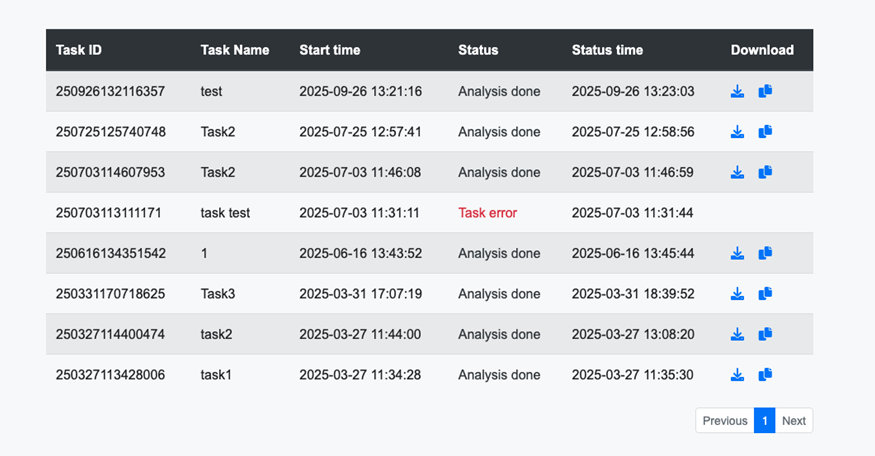
In this page, you can see the automatically assigned Task ID, Task Name you provided, Job submission time, Job Status, the time when the Job Status changes, and Download links.
- Task preparing Task is being initialized
- Data preparing Input data preparing for imputation
- Start Imputation Imputation process has started
- Analysis done Imputation task is completed
- Task Error If error during imputation implementation
- Input Error If an error is encountered during Input VCF parsing or Quality control of Input VCF
Download Results
We provided two ways to download the imputed results through Tasks page:
- Direct website download
- Download link can be used for command line tools (such as wget). This is highly recommended for output file with large size (>100M).
Requirement of input file
Please ensure that your input files meet the following requirements. One example of input vcf file is provided.
Important Notes
- The input file must be in VCF format and compressed by bgzip.
- The chromosomes should be encoded with prefix 'chr' (e.g. chr20).
- Only one single vcf.gz file can be uploaded for each imputation task.
Genotype imputation pipeline
The imputation pipeline implemented in this imputation server include:
1Input VCF parsing
We first check if the input file meets the requirements.
2Quality Control of Input VCF
We implemented the following filtering process for input VCF:
(i) Exclude variants with alleles are not "A", "T", "C", "G"
(ii) The input set was filtered using the following criteria: genotype missing rate < 5%, HWE exact test P-value > 1 × 10⁻¹⁰ and allele count > 0
${DIR}/${input}.vcf.gz -- -t AC,AF,HWE,MAF,F_MISSING
bcftools view -m2 -M2 -i 'F_MISSING < 0.05 & HWE > 1e-10 & AC > 0' \\
-o ${DIR}/${input}_filltags_filtered.vcf.gz ${DIR}/${input}_filltags.vcf.gz
(iii) The input set was sorted by genome position
3Imputation
We separate the input file to VCF of each chromosome and each file is processed in parallel. For each chromosome, imputation is implemented using Beagle5 with the following script (using demo data as an example). Finally, we merge outputs of all input chromosomes into one single vcf.gz.
ref=Han_SV_panel.chr20.hg38.vcf.gz \\
gt=input.vcf.gz \\
out=output \\
chrom=${chrom} \\
map=genetic_maps/beagle_${chrom}_b38.map \\
impute=true
Data Security and Privacy
Overall, this imputation service follows the Privacy Policy of Bio-Med Big Data Center (https://www.biosino.org/bmdc/privacyPolicy). The particular data privacy policy of this imputation server include:
- All steps (data transfer, data analysis, data storage) are executed on a secure server, hosted on www.biosino.org.
- All nodes for imputation compute can only be accessed on a local area network and only administrators can log in.
- Users can only view their own tasks and data.
- All data is preserved on our server only for 180 days. After the imputation is finished or failed, all results will be deleted in 180 days.
- We only store the number of samples and markers for imputation tasks. We will never "read" your data in any case.
Contact
Please contact shaohua_fan@fudan.edu.cn for any questions related to the reference panel and the use of this imputation server.